Flow Control and Exception Handling in Java
- Module Objectives
This module will help you satisfy the following exam objectives for flow control and exception handling:- Write code using
ifandswitchstatements and identify legal argument types for these statements. - Write code using all forms of loops, including labeled and unlabeled use of
breakandcontinue, and state the values taken by loop counter variables during and after loop execution. - Write code that makes proper use of exceptions and exception handling clauses (
try,catch,finally) and declare methods, including overriding methods, that throw exceptions.
- Write code using
Selection Statements: if and switch
if and switch. Both let a program choose between different paths of execution, but they differ in the kinds of values they can test and in how the exam expects you to reason about them.
The if Statement
Anif statement evaluates a boolean expression, and only a boolean expression. Unlike some other languages, Java will not implicitly convert an int to a boolean, so code such as if (count) will not compile.
int score = 82;

if (score >= 90) {
    System.out.println("Grade: A");
} else if (score >= 80) {
    System.out.println("Grade: B");
} else {
    System.out.println("Grade: C or below");
}else if is evaluated only when every preceding condition was false, and at most one branch runs. Watch for dangling-else problems on the exam: an else always binds to the nearest unmatched if, no matter how the code is indented. The ternary operator (condition ? valueIfTrue : valueIfFalse) is a compact alternative to a simple if/else when both branches produce a value:
String status = (score >= 60) ? "Pass" : "Fail";The switch Statement and switch Expression
Aswitch can test a limited set of types: byte, short, char, int and their wrapper classes, String, enum constants, and, in modern Java, sealed type hierarchies through pattern matching. It cannot test long, float, double, or boolean; those aren't legal argument types, and code that tries to switch on them will not compile.
Traditional switch statements fall through by default, so each case needs an explicit break unless you intend execution to continue into the next case:
int day = 3;
String name;

switch (day) {
    case 1:
        name = "Monday";
        break;
    case 2:
        name = "Tuesday";
        break;
    case 3:
        name = "Wednesday";
        break;
    default:
        name = "Unknown";
}->) syntax, does not fall through, and can return a value directly:
String name = switch (day) {
    case 1 -> "Monday";
    case 2 -> "Tuesday";
    case 3 -> "Wednesday";
    default -> "Unknown";
};sealed interface Shape permits Circle, Square {}
record Circle(double radius) implements Shape {}
record Square(double side) implements Shape {}
static double area(Shape shape) {
return switch (shape) {
case Circle c -> Math.PI * c.radius() * c.radius();
case Square s -> s.side() * s.side();
};
}Shape is sealed and permits only Circle and Square, the compiler can verify the switch is exhaustive, so no default branch is required. The exam frequently tests whether you can spot a missing break in a traditional switch, so trace fall-through cases carefully before assuming the "obvious" output is correct.
Looping Statements
for loop, the enhanced for loop (sometimes called a for-each loop), the while loop, and the do-while loop. Each repeats a block of code, but they differ in when the loop condition is checked and how the loop variable is managed.
for (int i = 0; i < 5; i++) {
    System.out.println(i);
}
// i is out of scope here; the for loops counter does not survive the loop

int j = 0;
while (j < 5) {
    System.out.println(j);
    j++;
}
// j equals 5 here, because the while loop does not create its own scope

int k = 0;
do {
    System.out.println(k);
    k++;
} while (k < 5);
// a do-while always executes its body at least once, even if the condition starts falsefor loop declares its counter in the initialization clause, so that variable goes out of scope the moment the loop ends. A while or do-while loop, by contrast, typically uses a variable declared before the loop, so that variable keeps whatever value it held when the loop condition finally evaluated to false. Where the counter lives, and what value it holds after the loop finishes, is one of the more commonly missed points on the exam.
The enhanced for loop iterates over arrays and any type that implements Iterable, without exposing an index:
int[] scores = {70, 85, 90};
int total = 0;

for (int score : scores) {
    total += score;
}for loop to iterate backward, to skip elements, or to modify the underlying array by index; if you need any of that, reach for a basic for loop instead.
Labeled break and continue
An unlabeledbreak exits the innermost enclosing loop or switch, and an unlabeled continue skips to the next iteration of the innermost enclosing loop. When you need to affect an outer loop from inside a nested one, label the outer loop:
outer:
for (int row = 0; row < 3; row++) {
    for (int col = 0; col < 3; col++) {
        if (col == row) {
            continue outer;
        }
        if (row == 2 && col == 2) {
            break outer;
        }
        System.out.println(row + "," + col);
    }
}break or continue nested inside that specific loop. Expect at least one exam question that asks you to trace exactly how many lines a labeled loop like this one prints, and common mistakes to watch for include off-by-one errors in the boundary condition, forgetting to update the loop variable (which produces an infinite loop), and assuming an unlabeled break reaches further than the loop it's actually written in.
Garbage Collection
Every object you create with
new lives on the heap, and Java's garbage collector is responsible for reclaiming the memory of any object your program can no longer reach. "Reachable" means there is a live reference chain, starting from a running thread's stack, a static field, or JNI, that leads to the object. Once no such chain exists, the object becomes eligible for collection.
You can make an object eligible for collection in a few common ways:
Employee employee = new Employee("Ana");
employee = null; // the original Employee object is now unreachable

StringBuilder builder = new StringBuilder("draft");
builder = new StringBuilder("final"); // the "draft" object is now unreachable

void createLocal() {
    Employee temp = new Employee("Ben");
} // temp goes out of scope when the method returns; the object becomes eligibleSystem.gc() only sends a suggestion to the JVM; it does not force collection to happen. The finalize() method, once used to run cleanup code before an object was collected, is deprecated and should not be relied on. If you need deterministic cleanup, use try-with-resources and the AutoCloseable interface instead, both of which are covered in the exception handling section below.
In Java, the selection statements (
if and switch) and looping statements (for, enhanced for, while, and do-while) define the flow of control in your code, while garbage collection quietly manages memory in the background so you rarely need to think about it directly. Together, these two topics form the foundation the rest of this module builds on.
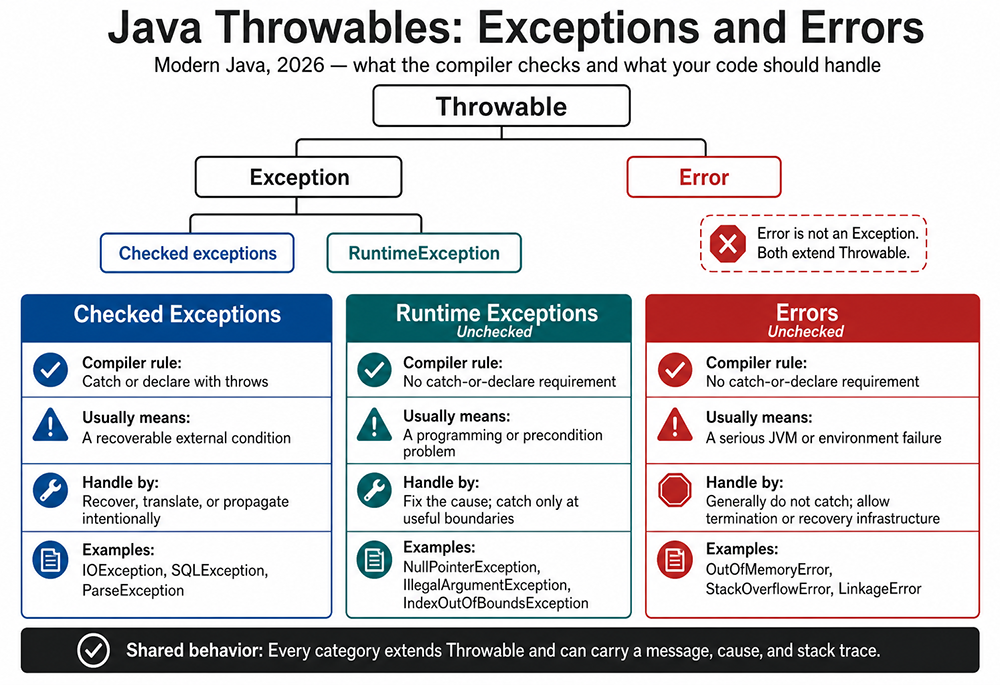
Java Throwables: Exceptions and Errors
Modern Java, 2026: what the compiler checks and what your code should handle.
Throwable hierarchy:
ThrowableException- Checked exceptions
RuntimeException
Error
Important: Error is not an Exception. Both extend Throwable.
Checked exceptions: The compiler requires them to be caught or declared with throws. They usually represent recoverable external conditions. Recover, translate, or propagate them intentionally. Examples include IOException, SQLException, and ParseException.
Runtime exceptions: These are unchecked, so there is no catch-or-declare requirement. They usually indicate a programming or precondition problem. Fix the cause and catch them only at useful boundaries. Examples include NullPointerException, IllegalArgumentException, and IndexOutOfBoundsException.
Errors: These are unchecked and usually indicate a serious JVM or environment failure. Generally, application code should not catch them; allow termination or recovery infrastructure to respond. Examples include OutOfMemoryError, StackOverflowError, and LinkageError.
Shared behavior: Every category extends Throwable and can carry a message, cause, and stack trace.
Exception Handling
try block contains code that might throw, a catch block handles a specific exception type, and an optional finally block runs whether or not an exception occurred.
try {
    int result = 10 / 0;
} catch (ArithmeticException e) {
    System.out.println("Cannot divide by zero: " + e.getMessage());
} finally {
    System.out.println("Cleanup runs either way");
}try {
riskyOperation();
} catch (IOException | SQLException e) {
logger.error("Operation failed", e);
}try-with-resources over a manual finally block. Any class implementing AutoCloseable can be declared in the parentheses after try, and Java guarantees it will be closed, in reverse order of declaration, even if an exception is thrown:
try (BufferedReader reader = new BufferedReader(new FileReader("data.txt"))) {
    String line = reader.readLine();
    System.out.println(line);
} catch (IOException e) {
    System.out.println("Could not read file: " + e.getMessage());
}
Declaring and Overriding Methods That Throw Exceptions
A method that might throw a checked exception must either catch it or declare it withthrows in the method signature:
void readConfig() throws IOException {
    Files.readAllLines(Path.of("config.txt"));
}RuntimeException, regardless of what the superclass method declares.
class Repository {
    void save() throws IOException { }
}

class FileRepository extends Repository {
    // Allowed: FileNotFoundException is a subclass of IOException
    @Override
    void save() throws FileNotFoundException { }
}
Three Main Categories
- Checked exceptions
- Runtime exceptions (unchecked exceptions)
- Errors
Exception to create a new checked exception, or extend RuntimeException to create a new unchecked one:
class InsufficientFundsException extends Exception {
    public InsufficientFundsException(String message) {
        super(message);
    }
}

class InvalidAccountException extends RuntimeException {
    public InvalidAccountException(String message) {
        super(message);
    }
}Common Exam Pitfalls
A short list worth reviewing before you move on:- Forgetting a
breakin a traditionalswitchstatement, causing execution to fall through into the next case. - Assuming an
elseattaches to the "obviously intended"if, when it actually binds to the nearest unmatched one. - Mixing up
whileanddo-while: onlydo-whileguarantees at least one execution of the loop body. - Forgetting that a basic
forloop's counter goes out of scope after the loop, while a variable declared before awhileloop does not. - Widening a checked exception when overriding a method, which will not compile.
- Assuming
System.gc()forces collection; it only requests it.