Reusing Modules with the Java Platform Module System
The Java Platform Module System (JPMS), introduced in Java 9 and available in all modern LTS releases (such as Java 17, 21, and 25), lets you organize applications into modules. Each module groups related packages and declares which other modules it depends on. This makes large systems easier to understand, maintain, and secure.
Where do imported packages come from?
When you write code that uses classes from java.lang, such as
String or System, you might ask:
Question: Where is that package imported from?
In modular Java, the answer is the java.base module. It contains
fundamental packages like java.lang and java.util.
Every module automatically reads java.base, which is why you can use
these core classes without writing any extra import or module directives.
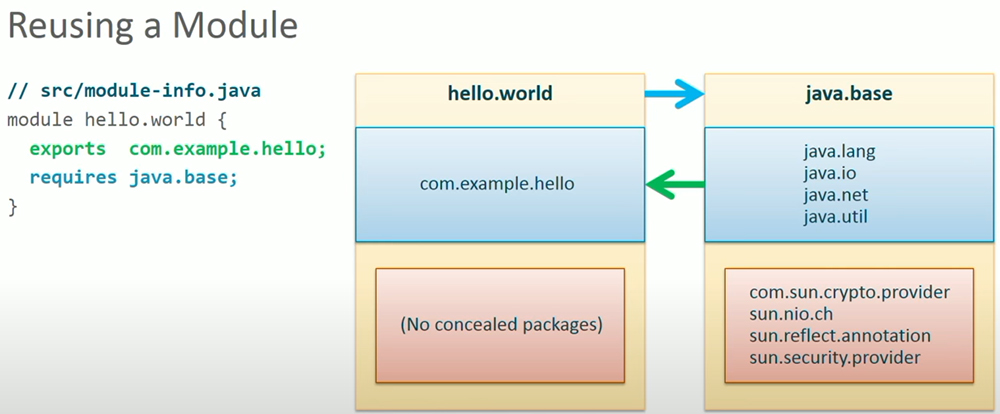
Modules, exported packages, and readable dependencies
A module is more than just a named collection of packages. It also declares which of its packages are exported for other modules to use, and which other modules it requires. If module A requires module B, then A is said to read B. Only packages exported by modules that A reads are available for import in Aâs code.
A simple module definition for a âHello Worldâ application might look like this:
module hello.world {
    exports com.example.hello;
    // java.base is readable by all modules automatically
}
Here:
hello.worldis the module name.com.example.hellois a package that this module exports to the outside world.-
The module automatically reads
java.base, so code incom.example.hellocan import public types from packages likejava.langandjava.util.
If your module needs functionality from another module such as java.logging,
you must declare that dependency explicitly:
module hello.world {
    exports com.example.hello;
    requires java.logging;
}
This explicit dependency model is what the JPMS calls reliable configuration: the compiler and runtime can verify that all required modules are present and compatible before your application starts.
What about internal or concealed packages?
Not every package inside a module is meant for external use. Many modules contain
internal or concealed packages that are not exported. For example,
the java.base module contains internal implementation packages such as
sun.security.provider.
Question: What happens if code in the hello.world module tries to import one of these concealed packages?
If you add an import like this:
import sun.security.provider.Sun;
the code compiles only if the containing module reads a module that exports the
sun.security.provider package. In practice, these internal packages are not
exported, so the compiler reports an error. This is a deliberate design choice:
- Internal APIs stay hidden, so they can change without breaking your application.
- Your code depends only on documented, supported APIs from exported packages.
In short, a module:
- Defines the packages it owns.
- Exports a subset of those packages for other modules to use.
- Declares which other modules it requires, making those modules readable.
Understanding how modules reuse exported packagesâand how the JPMS enforces these rulesâhelps you design applications that scale cleanly from small utilities to large, multi-module systems.