Reading Servlet Response - Exercise Result
You Said:An applet and servlet that work together
Your submission has been received and will be graded promptly.Suggested results
After loading the servlet URL into your browser, entering a name into the input field, and clicking the Submit button, you should see a page that looks like this (the name will vary based upon your input):
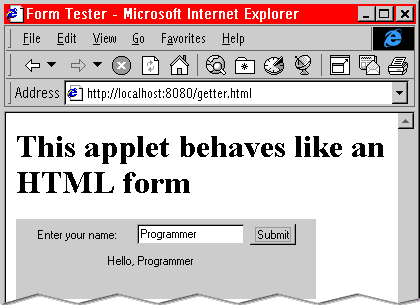
Following is the servlet code called Greeter.java that correctly completed this exercise.
import java.io.*;
import javax.servlet.*;
import javax.servlet.http.*;

public class Greeter extends HttpServlet{

  public void doGet(HttpServletRequest req, HttpServletResponse res) throws ServletException, IOException {
    res.setContentType("text/html");
    PrintWriter out = res.getWriter();

    //Get the name from the form
    String[] vals = req.getParameterValues("name");
    if (vals != null) {
        String name = vals[0];
        if (name.length() > 0) {
            out.println("Hello, " + name);
        }
        else {
          out.println("Hello, who ever you are");
        }
    }
  }
}
Following is the servlet code called Getter.java that correctly completed this exercise.
import java.awt.*;
import java.awt.event.*;
import java.applet.*;
import java.net.*;
import java.io.*;

public class Getter extends Applet implements ActionListener {
  private TextField input;
  private Label output = new Label("                                  ");

  public void init() {
    add(new Label("Enter your name: "));
    input = new TextField(14);
    add(input);
    Button button = new Button("Submit");
    add(button);
    button.addActionListener(this);
    add(output);
  }

  public void actionPerformed(ActionEvent event)  {
      String name = input.getText();
      try
         {
            output.setText("please wait");
            URL url = new URL(getCodeBase(),"/servlet/Greeter?name=" + name);
            URLConnection conn = url.openConnection();
            conn.setUseCaches(false);

            InputStream is = conn.getInputStream();
            BufferedReader reader = new BufferedReader(new InputStreamReader(is));
            String reply = reader.readLine();
            // Close the InputStream
            is.close();

            output.setText(reply);
        }
    catch (Exception e)  {
     System.out.println("Trouble connecting to servlet");
     System.out.println(e.toString());
          output.setText("connection attempt failed");
   }
  }
}